AR Aging Reports: How to Read Them and Act Faster
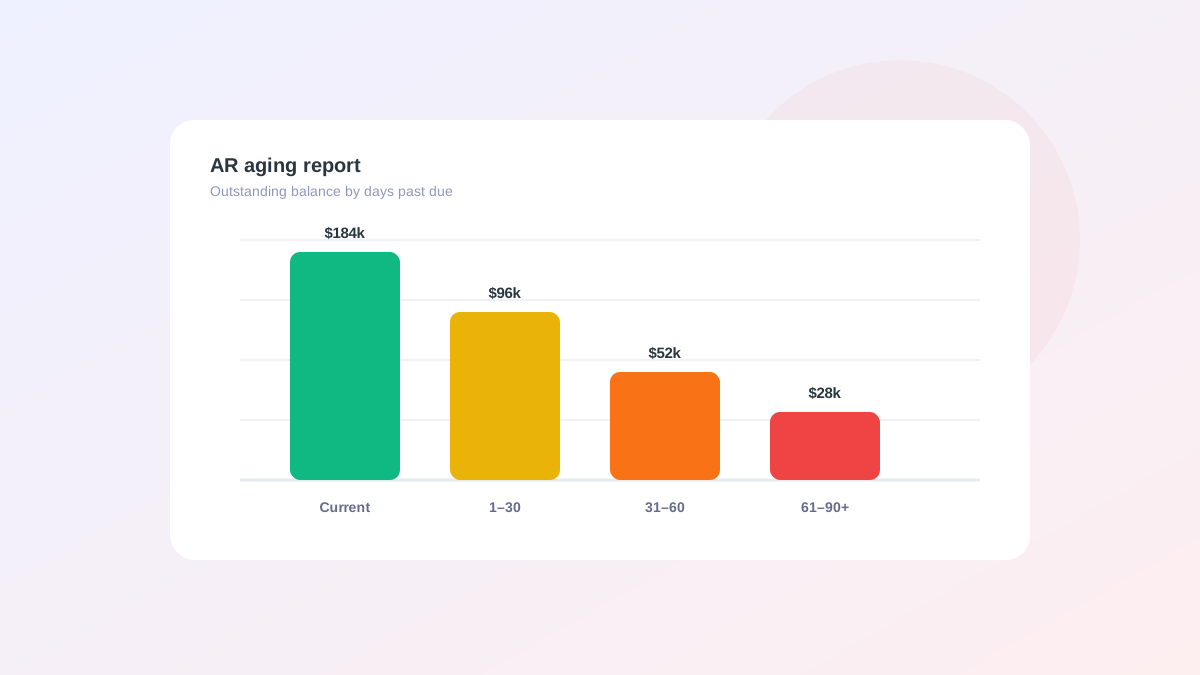
The accounts receivable aging report is the most actionable single document in receivables. It groups every open invoice by how long it has been outstanding, which turns a pile of individual invoices into a prioritized picture of where your cash is stuck. Many teams treat it as a static month-end artifact, and that habit wastes most of its value. Read and acted on weekly, the aging report becomes an operating tool that drives collections. This guide explains what the report shows, how to read its signals, how to turn it into action, and why stale cash application quietly undermines it.
What an aging report shows
An aging report buckets outstanding receivables by days past due, typically current, 1 to 30, 31 to 60, 61 to 90, and 90 plus. Each bucket carries a different risk profile. Current invoices are healthy and simply waiting for their due date. The 90 plus bucket is where write-off risk concentrates, because the longer an invoice ages, the less likely it is to be collected in full.
The shape of the distribution tells you instantly whether collections are keeping pace. A healthy report has most of its balance in the current and 1 to 30 buckets. A report with a growing tail in the older buckets is a warning that cash is getting stuck.
- Current: not yet due, healthy
- 1 to 30 days: watch, send gentle reminders
- 31 to 60 days: active follow-up needed
- 61 to 90 plus: escalation and growing write-off risk
How to read the signals
Read the report two ways. By bucket, to see how much cash sits at each stage of risk. By customer, to see which accounts are dragging the totals. A single large customer sitting in the 60 day bucket can distort your whole DSO, and the fix there is a targeted conversation rather than a blanket dunning blast to your entire ledger.
Trend matters as much as the snapshot. A 31 to 60 bucket that grows month over month is an early warning that collections are slipping, and it shows up in the aging report before it shows up in the headline DSO. Catching the trend early is what separates a quick correction from a quarter of slipping cash.
From report to action
An aging report is only useful if it drives action quickly. The gap between strong and weak AR teams is speed. Teams that act on aging weekly collect far more than those who review it once a month, because every week an overdue invoice sits without follow-up lowers the odds of full collection.
Tie each bucket to a defined response so reading the report immediately produces a to-do list rather than a feeling of dread. When the response is predefined, the report stops being something you study and becomes something you execute.
- Assign each overdue account a clear owner
- Trigger the right reminder for each bucket automatically
- Flag disputes separately so they do not look like slow pay
- Review the trend weekly, not only at close
Common mistakes when reading aging
The most common mistake is reading aging only at month-end, which means you act on data that is already weeks stale and miss the chance to follow up while an invoice is freshly overdue. The second mistake is reading the totals without drilling into the accounts behind them, which hides the fact that a few customers usually drive most of the risk.
A third mistake is letting disputes hide in the aging buckets. A disputed invoice sitting in the 60 day bucket looks like slow payment, but it needs resolution rather than a reminder. Pulling disputes out keeps the report honest and your follow-up focused on accounts that genuinely owe.
Why stale data undermines the report
An aging report is only as good as the cash application behind it. When payments sit unapplied, the report shows invoices as overdue that have actually been paid, and your team wastes effort chasing phantom debt while real problems hide in the noise. Customers who already paid get dunning notices, which damages the relationship and your credibility.
Fast, accurate cash application is the foundation that makes aging trustworthy. Without it, every other improvement to your collections process is built on numbers nobody can fully believe.
Live aging with Nudge
Alderstone's Nudge keeps aging current by applying cash continuously and surfacing open invoices, applied payments, and exceptions in one workspace, with your ERP authoritative for balances. Because the data is live, the aging report stops being a month-end snapshot and becomes a daily action list.
Reminders and owners are already tied to each bucket, so reading the report and acting on it become the same motion. That is how aging turns from a report you study into cash you collect.