ERP Integration Strategy: Automating Workflows Without Replacing Your ERP
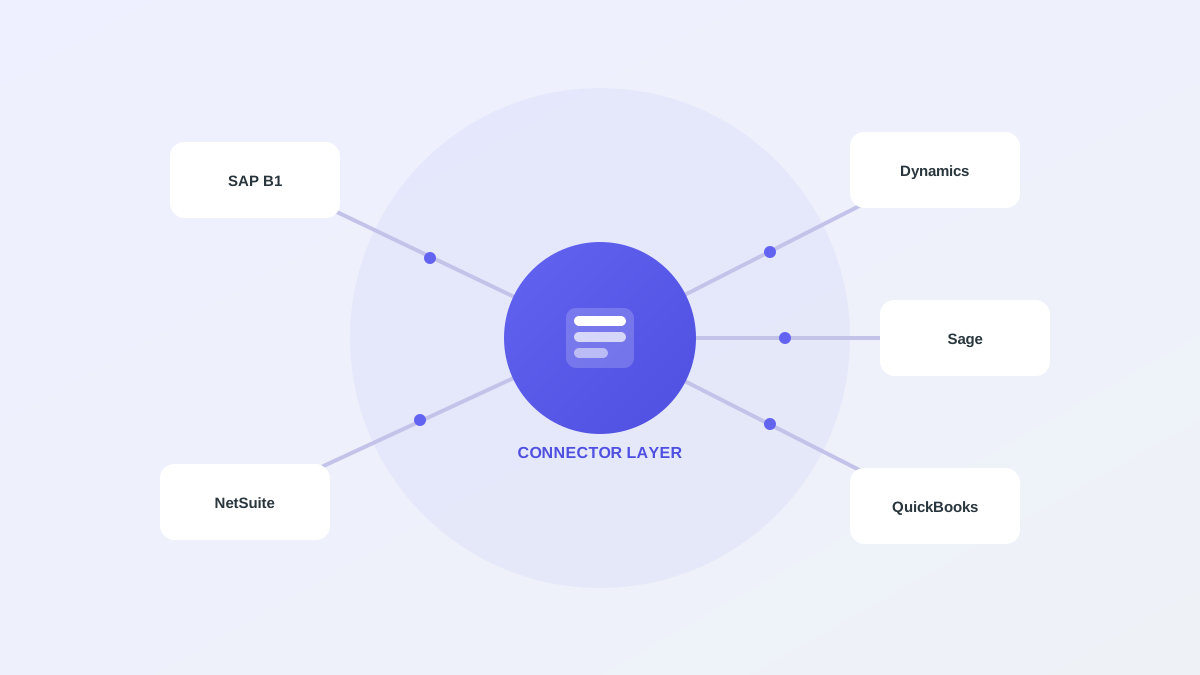
When teams set out to modernize order-to-cash, the instinct is often to look at a new ERP. That instinct is usually wrong. ERP migrations are multi-year, high-risk, and rarely the actual fix for slow order intake or messy cash application. The faster and safer path keeps the ERP you already have as the system of record and integrates automation around it through a connector layer. This article covers why that strategy wins, how a connector layer works in practice, and how to design the integration for multi-entity and multi-ERP environments.
Why replacement is the wrong default
Your ERP holds your master data, your financial controls, and years of institutional process baked into its configuration. Replacing it to fix an intake or cash-application bottleneck is like rebuilding a house to fix the plumbing. The risk is large, the timeline runs into years, and the workflow problems you set out to solve often survive the migration unchanged.
Most order-to-cash pain lives at the edges of the ERP, in the manual steps before data enters it and after cash arrives. Those edge steps are exactly the ones you can automate without touching the core, which is why integration beats replacement for the problems most teams actually have.
How a connector layer works
A connector layer sits between your automation and your ERP. It translates clean, validated records into ERP-native objects such as draft sales orders or applied cash. The automation does the messy work of reading documents and matching payments. The connector handles the structured write-back through staging tables or service-layer APIs, depending on the ERP version and your level of customization.
Because the ERP remains authoritative, nothing posts without passing your validation rules and, in most configurations, a human approval. The connector is a controlled doorway with rules attached, so automation accelerates the routine work while the ERP keeps enforcing the controls it always has.
Patterns for multi-entity environments
B2B operators frequently run more than one legal entity, company code, or even more than one ERP instance. A good integration isolates data for each entity while sharing a common automation layer, so every company keeps its own approval chains and connector credentials and still benefits from the same extraction and matching engine.
This separation matters for both control and clarity. Each entity's auditors see only that entity's data, and each business unit keeps its own rules, while the engineering team maintains one integration surface rather than a separate stack per company.
- Per-company ERP endpoints and credentials
- Role-scoped access across workspaces
- Isolated approval chains for each entity
- Central audit log export across all entities
Designing for safe write-back
The write-back path is where engineering discipline matters most, because this is where automation touches the system of record. Validate before you push, so nothing reaches the ERP that fails your rules. Push drafts rather than committed records wherever the ERP supports it, so a human still confirms before anything becomes final.
Detect duplicates so a re-sent PO does not become a duplicate order, which is one of the most common and embarrassing automation failures. Log every push with its outcome and the resulting record identifier, so you can reconcile what the automation did against what the ERP recorded and explain any discrepancy.
Handling connector differences across ERPs
Different ERPs expose different integration surfaces, and the right approach depends on the platform. SAP Business One often calls for the service layer or carefully managed staging tables. NetSuite exposes SuiteTalk and REST records. Dynamics and Sage each have their own APIs and quirks around custom fields.
The value of a shared connector layer is that the automation logic stays the same while only the connector adapter changes per platform. Your extraction and matching rules do not need to know which ERP they are writing to, which keeps the system maintainable as you add platforms or onboard an acquisition running something different.
Alderstone's approach
Alderstone treats the ERP as the system of record and integrates through a shared connector layer used by both OrderBridge and Nudge. Whether you run SAP Business One, NetSuite, Dynamics, Sage, or QuickBooks, the automation reads and validates data and writes back drafts for approval through the adapter for your platform.
Multi-company workspaces isolate each entity's data while keeping a single integration surface, so you can scale automation across the business without scaling the integration burden. You add a new company by configuring a connector, not by rebuilding the platform.